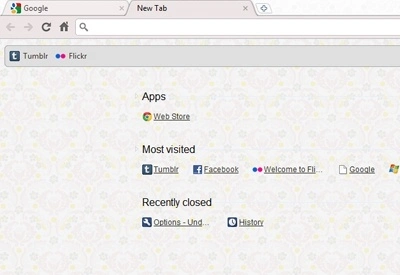

Pale Baroque Desktop Theme for Windows & Mac
Overview
The Pale Baroque Desktop Theme offers a refined aesthetic for users who appreciate minimalist design and subtle elegance. With its soft color palette and delicate baroque-inspired patterns, this theme creates a visually calming environment ideal for focused work or creative projects. Designed for those who favor light and pastel tones, especially shades of gray, it provides a unique alternative to standard desktop backgrounds. The theme is intended for individuals seeking a personalized digital workspace without compromising on simplicity or visual harmony.
Target users include digital artists, writers, and professionals who value a serene and inspiring interface. The theme’s design draws from classical baroque art, reinterpreted in a modern, muted style. It is suitable for both Windows and Mac systems, offering cross-platform consistency. While the developer did not provide additional details about the creator’s background, the theme is hosted on a personal blog, suggesting a niche, handcrafted approach to digital design. Real-world usage scenarios include setting up a distraction-free workspace, enhancing productivity through visual comfort, or simply expressing personal taste in digital aesthetics.
Key Features & Capabilities
- Pale Color Palette – Features soft, light tones with a focus on gray and pastel hues, ideal for reducing eye strain during extended screen use.
- Baroque-Inspired Pattern – Incorporates delicate, intricate designs reminiscent of 17th-century baroque art, reimagined in a minimalist, modern form.
- Cross-Platform Support – Compatible with both Windows and Mac operating systems, ensuring consistent appearance across devices.
- Lightweight Design – At only 1.5 MB, the theme requires minimal storage space and loads quickly without impacting system performance.
- Easy Installation – Designed for straightforward application, allowing users to apply the theme with minimal technical effort.
Users can apply the theme to enhance their desktop environment, particularly in settings where visual clarity and aesthetic comfort are prioritized. For example, writers may use it to create a calm workspace, while designers might leverage its subtle patterns as inspiration. The theme is not interactive or animated, focusing instead on static visual appeal. It serves as a passive enhancement to the user interface, making it ideal for those who prefer understated digital environments over flashy or dynamic visuals.
User Interface, Workflow & Performance
The theme operates entirely at the system level, modifying the desktop background and visual style without altering core interface elements. Navigation remains unchanged, preserving the user’s established workflow. The interface is static, meaning no interactive components are embedded within the theme itself. Users interact with the system as usual, with the theme serving as a background enhancement.
Performance impact is expected to be negligible due to the theme’s small file size and non-interactive nature. The developer did not specify resource usage details, but based on general software behavior, such lightweight themes typically consume minimal CPU and RAM. Stability is likely consistent with standard desktop customization tools, though no formal testing data was provided. Users can expect smooth operation across supported systems, with no reported issues related to crashes or conflicts.
Compatibility & System Requirements
The Pale Baroque Desktop Theme is designed for use on Windows and Mac operating systems. Version 1.0 was released on March 15, 2024, and the installation file size is 1.5 MB. While the developer did not provide specific hardware requirements, the lightweight nature of the theme suggests compatibility with most modern desktop systems.
Exact system requirements were not listed. Compatibility information was partially provided. Users should ensure their operating system is up to date and supports custom desktop themes.
For Windows, this includes support for the Personalization settings in the latest versions. On Mac, the theme can be applied through the Desktop & Screen Saver preferences. No additional software or plugins are required for installation.
Pros and Cons
Pros
- Visually soothing design with a focus on pale and gray tones
- Unique baroque-inspired aesthetic that stands out from standard themes
- Lightweight at only 1.5 MB, minimizing system impact
- Available for both Windows and Mac users
- Free to download and use with no licensing restrictions
Cons
- No interactive or animated elements included
- Limited customization options beyond the background
- Developer did not provide detailed system requirements
- Static design may not appeal to users seeking dynamic interfaces
- Support and updates are not publicly documented
FAQ Section
Is this theme compatible with Windows and Mac?
Yes, the Pale Baroque Desktop Theme is compatible with both Windows and Mac operating systems, as specified by the developer.
Is the theme free to use?
Yes, the theme is available at no cost. It is distributed as a free desktop theme with no hidden fees or subscription models.
Does the theme require any additional software?
No, the theme does not require any additional software or plugins. It can be applied directly through the system’s desktop customization settings.
Can I update the theme after installation?
Updates are not publicly documented. Users should check the developer’s website for any new versions or modifications.
Is the theme secure to download and install?
While no security risks were reported, users should download the theme only from the official source: mariahb.methemesbymariah.tumblr.com, to ensure authenticity and avoid potential tampering.
Final Thoughts + CTA
The Pale Baroque Desktop Theme presents a thoughtful, visually appealing option for users who value understated elegance and a calm digital workspace. Its delicate baroque patterns and soft gray palette offer a refreshing alternative to standard desktop backgrounds, particularly for creative professionals and individuals seeking a distraction-free environment. Though it lacks advanced features or interactivity, its simplicity is its strength, delivering a serene and consistent visual experience across platforms.
For those who appreciate subtle design and a personalized touch, this free theme is a worthwhile addition to any desktop setup. It combines aesthetic refinement with technical lightness, making it accessible to a wide range of users. The lack of detailed documentation and update tracking is a minor drawback, but the core experience remains stable and reliable.
Download Pale Baroque Desktop Theme now







